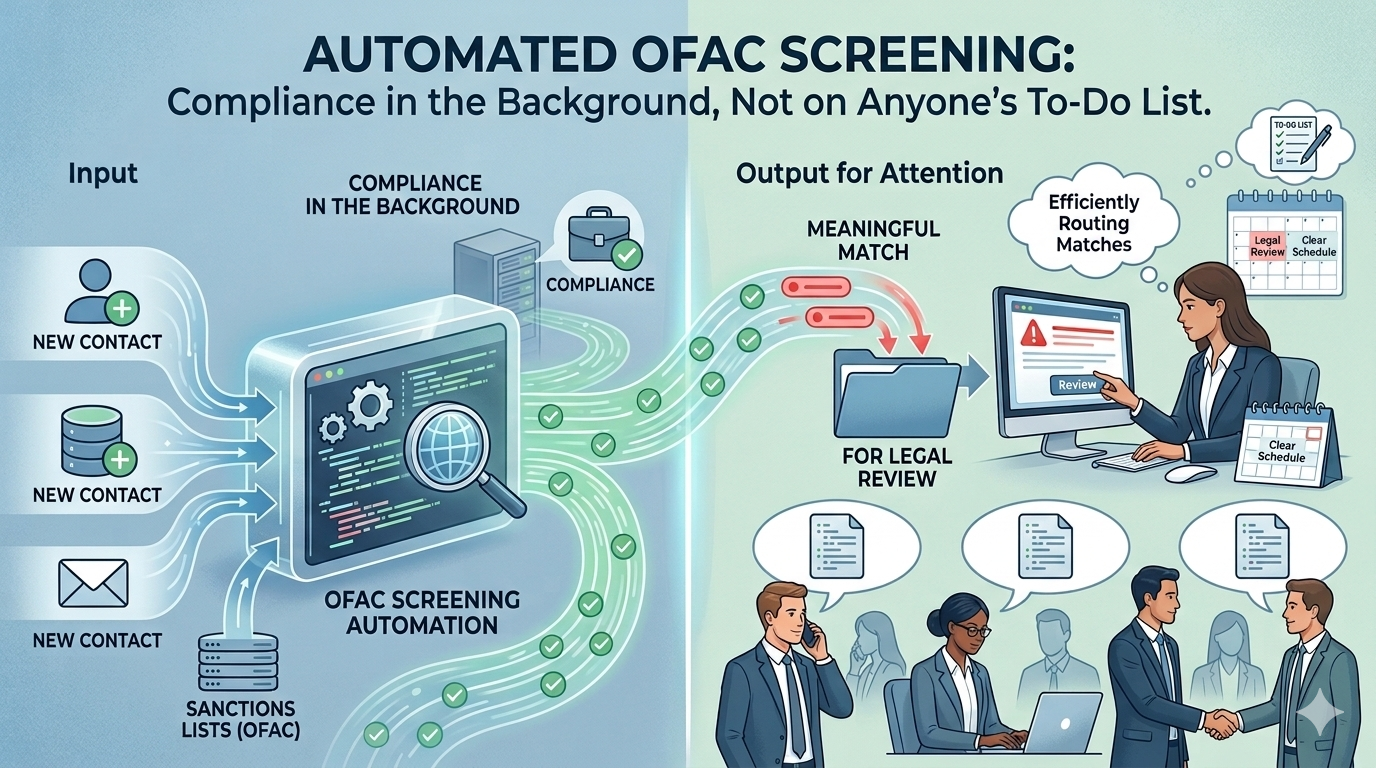
Recipe: Sanctions Screening, Baked into Every Workflow
Screen every new contact against the U.S. Treasury sanctions lists automatically — self-hosted, near-zero cost, and integrated directly into HubSpot workflows.
About This Recipe
The OFAC Specially Designated Nationals list and Consolidated Sanctions list together cover around 19,000 sanctioned individuals, entities, vessels, and aircraft. If your business has compliance obligations, you need to screen customers against them. The lists are public — published directly by the U.S. Treasury — but getting reliable screening into your workflow is where the work is.
The practical problem isn't that the data is inaccessible. OFAC provides a web search tool. The problem is relying on go-to-market teams to use it consistently and accurately at scale, or routing every new contact through a legal team that has better things to do than run manual lookups. Neither holds up as the business grows.
This recipe builds a self-hosted screening API on GCP and wires it into a HubSpot workflow. When a contact is enrolled, the workflow calls the API, gets back a match result, and writes it to the contact record. No third-party screening service. No per-query fees. No manual lookups.
The API loads all 19,000 entities into memory at startup and runs three fuzzy matching algorithms in parallel. Non-Latin names are indexed in both their original script (Arabic, Cyrillic, Chinese, etc.) and their transliterated Latin form — so a query in either form finds a match. A length penalty prevents short strings from accidentally matching long names. Results are classified as Match, Review, or No Match based on a configurable similarity threshold.
| Difficulty |
Intermediate |
| Prep Time |
~20 mins (GCP setup) |
| Cook Time |
~15 mins (one deploy command) |
| Serves |
Any team with OFAC compliance obligations using HubSpot |
| Allergens |
Requires a GCP project with billing enabled. Does not require any paid third-party services. |
Ingredients
Accounts & Access
- 1× GCP account with billing enabled and project owner or editor role
- 1× HubSpot account with workflow access and ability to create custom properties
Environment
gcloud CLI installed and authenticated- Python 3.11+ (for local testing only — not required for deployment)
From the pantry (provided in this repo)
- FastAPI search service — fuzzy matching, transliteration, configurable threshold
- Cloud Function — daily sync from the official OFAC Sanctions List Service
- One-command deploy script — handles all GCP infrastructure setup
- HubSpot custom code action — drops into any workflow in minutes
- Local test script — verify the API before connecting HubSpot
Method
Mise en Place — Two Things to Have Ready
1. A GCP project ID
You need an existing GCP project with billing enabled. Note the project ID — that's all the deploy script needs.
2. Eight HubSpot custom properties
Before wiring up the workflow, create these properties on the Contact (or Company) object in HubSpot under Settings → Properties → Create property:
| Display name |
Internal name |
Type |
| OFAC Check Status |
ofac_check_status |
Single-line text |
| OFAC Check Result |
ofac_check_result |
Single-line text |
| OFAC Match Score |
ofac_match_score |
Number |
| OFAC Entity UID |
ofac_entity_uid |
Single-line text |
| OFAC Matched Name |
ofac_matched_name |
Single-line text |
| OFAC Entity Type |
ofac_entity_type |
Single-line text |
| OFAC Programs |
ofac_programs |
Single-line text |
| OFAC Lists |
ofac_lists |
Single-line text |
Part One: Deploy to GCP
One command. The script handles everything.
export GCP_PROJECT_ID="your-project-id" ./cloud/deploy.sh
This single script:
- Enables all required GCP APIs
- Creates a dedicated Firestore database (
ofac-sanctions)
- Generates an API key and stores it in Secret Manager
- Deploys the ingestion Cloud Function (
ofac-sync)
- Builds and deploys the search API to Cloud Run (
ofac-search-api)
- Triggers an initial sync — pulls ~19,000 entities from the U.S. Treasury
- Creates a daily Cloud Scheduler job (06:00 UTC)
At the end it prints your API URL and API key — save both.
Verify it worked:
curl https://YOUR_API_URL/health # Should return: {"status": "healthy", "entities_loaded": ~19000, ...} curl -X POST https://YOUR_API_URL/screen \ -H 'X-API-Key: YOUR_API_KEY' \ -H 'Content-Type: application/json' \ -d '{"name": "BANCO NACIONAL DE CUBA"}' # Should return a match with score 1.0
Part Two: Connect HubSpot
Add one Custom Code action to a workflow.
- Create or open a contact-based workflow
- Add a Custom Code action
- Paste the contents of
local/hubspot/ofac_screening_action.js
- Under Secrets, add:
OFAC_API_URL = your Cloud Run URLOFAC_API_KEY = your API key
- Under Properties to include in code, add:
firstname, lastname, company
- Map each output field to its matching custom property
Enroll a test contact to verify results are written back to the contact record.
Plating Notes
Serving Suggestion
The screening result properties are the foundation — the real value comes from the workflows you build on top of them.
Review queue: add a workflow branch that triggers when ofac_check_result = Review or Match. Use HubSpot's task creation action to add a task to the legal team's queue and send them a notification. The legal team only sees the small number of cases that actually need attention — not every new contact.
Deal alerts: create a deal-based workflow that checks the associated contact's ofac_check_result when a deal is created. If it's Match, fire notifications to the sales rep, their manager, and the legal team before the deal can progress. HubSpot's native notification and internal email actions handle this without any additional tooling.
Segment lists: ofac_check_result and ofac_programs are standard HubSpot properties — use them to build active lists for reporting, filtering, or suppression. One design decision worth being deliberate about: whether to suppress flagged contacts from marketing outreach entirely, or keep them visible in the system for compliance tracking. Both are valid depending on your team's process.
Shelf Life
The OFAC Sanctions List Service API is a U.S. government API — it's stable but not versioned in the conventional sense. If the sync stops producing results, check the ingestion Cloud Function logs first. The most common cause is a change to the SLS publication history endpoint, which is the mechanism used to detect new publications. The field mappings in cloud/ingestion/main.py are the other likely point of change if OFAC modifies their XML schema.
Full Recipe
Complete source code and the one-command deploy script are in the GitHub repository:
github.com/Suixcity/ofac-screening
Part of a professional portfolio — view the project brief
%20(4).png)